Opinions, Expertise, Passion.

Information in black and white, and sometimes some color.

May
30

Improving Open Source Databases - WordPress

Link to this post

As part of both my UltimateLAMP side project, and my greater involvement with MySQL Workbench, I’ve been wanting to review and document the database schemas of Open Source products.

Indeed, as part of discussions with Mike Zinner of MySQL AB at the recent MySQL Users Conference, I suggested an idea used in the Java World, for example by Clover and Agitar, where to promote the usefullness of their respective tools (in this case code coverage), they provide results against Open Source Products. For an example check out Clover Examples.

With MySQL Workbench, to get some greater exposure of the use of graphical Data Modelling tool, I mentioned the idea of providing a respository of schemas, may help in exposure, usage and feedback of MySQL Workbench. Indeed my work is towards this being added to MySQL Forge, however I’ve found that at my first indepth work, using WordPress 2.0.2 has been a less then successful experience.

The schema would rate a 2 out of 5 on my scale of optimal database schemas. Here are some of my initial findings.

  • Inconsistent naming standards
    • ID uppercase for primary keys in some tables, but not in others.
    • different standards for primary keys, some id, some [table]_id
    • Inconsistent identification of foreign keys (e.g. post_parent). All keys should have _id.
    • Inconsistent datatypes for optional foreign keys (e.g. default of 0 rather then NULL)
    • Inconsistent column naming standards, some tables prefix columns with table name or table like name, (e.g. post_), but not all columns. Some tables has multiple prefix values (e.g. cat_, category_)
  • Poor usage of datatypes. Examples include BIGINT(20) for primary keys, TEXT for post title, INT(10) for columns which as values a TINYINT can support.
  • Inconsistent use of enums (e.g. Y/N for some values, and yes/no for others)
  • No Referential Integrity support (ie. Foreign Keys), limiting the benefits of a modelling tool showing table relationships
  • Different rules for primary keys (most tables have a suggorate key, but not all)

I am actually working on A MySQL Guide to Database Modelling, Design and Support, which covers a lot of these points and more. I’m some way from completing this document, but this initial research of the WordPress product highlights it’s importance to the open source community.

Of course we can just make noise about what we don’t like, or we can do something about it. I’m submitting my ideas, suggestions and code changes to the project. What is done about it is outside of my control, but I’ve at least given my input to this Open Source Product.

WordPress 2.0.2 Schema SQL (taken from a mysqldump after installation)

Here is a graphical representation of the Data Model from MySQL Workbench.
NOTE: My MySQL Workbench will not enable me to do a Export Image, so I’ll need to add this at a later time

Introducing Referential Integrity

Unfortunately this is no automated means of creating appropiate Referential Integrity for a schema. With more strict naming standards, it would be possible to reconstuct this information generally.

The approach to create these new rules were performed manually, but a tool could be developed to provide approximations for a number of these.

# Implement Foreign Keys. Changes include:
#  - Appropiate Storage Engine
#  - ensure column is of same definition as matching primary key (e.g. datatype + unsigned)
#  - create index for foreign key
#  - ensure optional keys use NULL

ALTER TABLE wp_categories ENGINE=InnoDB;
ALTER TABLE wp_comments ENGINE=InnoDB;
ALTER TABLE wp_linkcategories ENGINE=InnoDB;
ALTER TABLE wp_links ENGINE=InnoDB;
ALTER TABLE wp_options ENGINE=InnoDB;
ALTER TABLE wp_post2cat ENGINE=InnoDB;
ALTER TABLE wp_postmeta ENGINE=InnoDB;
ALTER TABLE wp_posts ENGINE=InnoDB;
ALTER TABLE wp_usermeta ENGINE=InnoDB;
ALTER TABLE wp_users ENGINE=InnoDB;

ALTER TABLE wp_usermeta MODIFY user_id  bigint(20) UNSIGNED NOT NULL DEFAULT '0';
ALTER TABLE wp_usermeta ADD FOREIGN KEY usermeta_users_fk (user_id) REFERENCES wp_users(ID) ON DELETE CASCADE;

ALTER TABLE wp_posts MODIFY post_author BIGINT(20) UNSIGNED NOT NULL;
CREATE INDEX post_author ON wp_posts(post_author);
ALTER TABLE wp_posts ADD FOREIGN KEY posts_users_fk (post_author) REFERENCES wp_users(ID) ON DELETE CASCADE;

ALTER TABLE wp_posts MODIFY post_parent BIGINT(20) UNSIGNED NULL DEFAULT NULL;
UPDATE wp_posts SET post_parent = NULL WHERE post_parent = 0;
CREATE INDEX post_parent ON wp_posts(post_parent);
ALTER TABLE wp_posts ADD FOREIGN KEY posts_posts_fk (post_parent) REFERENCES wp_posts(ID);

ALTER TABLE wp_postmeta MODIFY post_id  bigint(20) UNSIGNED NOT NULL DEFAULT '0';
ALTER TABLE wp_postmeta ADD FOREIGN KEY postmeta_posts_fk (post_id) REFERENCES wp_posts(ID) ON DELETE CASCADE;

ALTER TABLE wp_categories MODIFY cat_ID BIGINT(20) UNSIGNED NULL DEFAULT NULL AUTO_INCREMENT;
ALTER TABLE wp_categories MODIFY category_parent BIGINT(20) UNSIGNED NULL DEFAULT NULL;
UPDATE wp_categories SET category_parent = NULL WHERE category_parent = 0;
ALTER TABLE wp_categories ADD FOREIGN KEY categories_categories_fk (category_parent) REFERENCES wp_categories(cat_ID);

ALTER TABLE wp_post2cat MODIFY rel_id BIGINT(20) UNSIGNED NOT NULL AUTO_INCREMENT;
ALTER TABLE wp_post2cat MODIFY post_id BIGINT(20) UNSIGNED NOT NULL;
ALTER TABLE wp_post2cat MODIFY category_id BIGINT(20) UNSIGNED NOT NULL;
ALTER TABLE wp_post2cat ADD FOREIGN KEY post2cat_posts_fk (post_id) REFERENCES wp_posts(ID) ON DELETE CASCADE;
ALTER TABLE wp_post2cat ADD FOREIGN KEY post2cat_categories_fk (category_id) REFERENCES wp_categories(cat_ID) ON DELETE CASCADE;
ALTER TABLE wp_comments MODIFY user_id BIGINT(20) UNSIGNED NULL DEFAULT NULL;
UPDATE wp_comments SET user_id = NULL WHERE user_id = 0;
CREATE INDEX user_id ON wp_comments(user_id);
ALTER TABLE wp_comments ADD FOREIGN KEY comments_users_fk (user_id) REFERENCES wp_users(id) ON DELETE CASCADE;
ALTER TABLE wp_comments MODIFY comment_post_ID BIGINT(20) UNSIGNED NULL DEFAULT NULL;
ALTER TABLE wp_comments ADD FOREIGN KEY comments_posts_fk (comment_post_ID) REFERENCES wp_posts(ID) ON DELETE CASCADE;

ALTER TABLE wp_comments MODIFY comment_parent BIGINT(20) UNSIGNED NULL DEFAULT NULL;
UPDATE wp_comments SET comment_parent = NULL WHERE comment_parent = 0;
CREATE INDEX comment_parent ON wp_comments(comment_parent);
ALTER TABLE wp_comments ADD FOREIGN KEY comments_comments_fk (comment_parent) REFERENCES wp_comments(comment_id);

ALTER TABLE wp_linkcategories MODIFY cat_id BIGINT(20) UNSIGNED NOT NULL AUTO_INCREMENT;
ALTER TABLE wp_links MODIFY link_category BIGINT(20) UNSIGNED NOT NULL;
ALTER TABLE wp_links ADD FOREIGN KEY links_category_fk (link_category) REFERENCES wp_linkcategories(cat_id);

While there are no column name changes, by default the WordPress code should operate with this revised schema. Issues would include a poor delete strategy that still voilates the liberal constraints now enforced. Special handling of 0 for optional columns when the value is now NULL may also be a problem.

Revised Data Model in MySQL Workbench.
NOTE: My MySQL Workbench will not enable me to do a Export Image, so I’ll need to add this at a later time

Introducing improved Standards

Of course, I’d like to see the schema improve, here are my first draft ideas for improvements of the schema.

# Naming Improvements ===================================================================================
# Rename to lowercase id
ALTER TABLE wp_users CHANGE ID id BIGINT(20) UNSIGNED NOT NULL AUTO_INCREMENT;
ALTER TABLE wp_posts CHANGE ID id BIGINT(20) UNSIGNED NOT NULL AUTO_INCREMENT;
ALTER TABLE wp_categories CHANGE cat_ID cat_id BIGINT(20) UNSIGNED NOT NULL AUTO_INCREMENT;
ALTER TABLE wp_comments CHANGE comment_ID comment_id BIGINT(20) UNSIGNED NOT NULL AUTO_INCREMENT;
ALTER TABLE wp_comments CHANGE comment_post_ID comment_post_id BIGINT(20) UNSIGNED NOT NULL;

# Include _id for all Foreign Keys
ALTER TABLE wp_posts CHANGE post_author post_author_id BIGINT(20) UNSIGNED NOT NULL;
ALTER TABLE wp_posts CHANGE post_parent post_parent_id BIGINT(20) UNSIGNED NOT NULL;
ALTER TABLE wp_categories CHANGE category_parent category_parent_id BIGINT(20) UNSIGNED NOT NULL;
ALTER TABLE wp_comments CHANGE comment_parent comment_parent_id BIGINT(20) UNSIGNED NULL DEFAULT NULL;
ALTER TABLE wp_links CHANGE link_category link_category_id BIGINT(20) UNSIGNED NULL DEFAULT NULL;

# Primary Key Name Standardisation
ALTER TABLE wp_posts CHANGE id post_id BIGINT(20) UNSIGNED NOT NULL AUTO_INCREMENT;
ALTER TABLE wp_users CHANGE id user_id BIGINT(20) UNSIGNED NOT NULL AUTO_INCREMENT;

# Foreign Key Standardisation
ALTER TABLE wp_categories MODIFY category_parent_id parent_id BIGINT(20) UNSIGNED NOT NULL;
ALTER TABLE wp_comments CHANGE comment_parent_id parent_id BIGINT(20) UNSIGNED NULL DEFAULT NULL;

# Other Column Standaisations
ALTER TABLE wp_categories MODIFY cat_name category_name VARCHAR(55) NOT NULL;

# Column width improvements
ALTER TABLE wp_categories MODIFY category_count MEDIUMINT(5) NOT NULL DEFAULT '0';
ALTER TABLE wp_posts MODIFY post_title VARCHAR(255) NOT NULL;
ALTER TABLE wp_linkcategories MODIFY cat_name VARCHAR(255) NOT NULL;
ALTER TABLE wp_linkcategories MODIFY cat_id TINYINT(3) UNSIGNED NOT NULL AUTO_INCREMENT;
ALTER TABLE wp_options MODIFY autoload ENUM('Y','N') NOT NULL DEFAULT 'Y';

# Obvious Index Improvements
# Make login a unique index
DROP INDEX user_login_key ON wp_users;
CREATE UNIQUE INDEX  user_login_key  ON wp_users(user_login);

These will require code changes and adequate testing, something I’m not hopeful would happen unless I drove it, but you never know, the next time I review the WordPress Schema I might be impressed.

Conclusion

This is just a broadstroke first review of the schema. As part of all good design, testing of the code, further review and refinement based on better understanding of the product, and also peer review are all important steps not yet undertaken.

Posted under Databases, GUI Products, General, MySQL on 30 May 2006
Comments (2)
May
30

Google Talk

Link to this post

Google has like many before it such as AOL, Yahoo and Skype created it’s own online chat program, which you can run with a windows program and which is very neatly integrated into Gmail.com. However I don’t use windows, I use Linux and by using the Jabber protocol Google Talk is designed to be compatible with other talk clients.

I just could not get the sucker to operate within Gaim successfully. Seems I was missing an advanced setting as found at http://www.google.com/support/talk/bin/answer.py?answer=24073 Now I have a successful login, I just need some other friends to join Google Talk

Posted under General, Google on 30 May 2006
Comments (0)
May
29

Seaching Google in Klingon or Elmer Fudd

Link to this post

Sometimes I wonder how I get to trivial information. Well in the Wikipedia article Google Hoaxes you will find that the Google search engine is valid in a number of unusual languages including Klingon. I’m a Star Trek fan, but that’s going a little to far, however I guess if they create Elvish Language the LOTR people would love it. My favourites are Elmer Fudd and Bork Bork Bork. For those that don’t know this line, it’s famous from the Chef in the Muppets.


There are plenty more, I noticed the added Hacker recently. What’s really funny is select a language, then go back to the languages page, and see if you understand the names of the other languages. 

My original Blog Post Some light hearted Google Fun

Posted under General, Google on 29 May 2006
Comments (0)
May
28

The GWT

Link to this post

So what is GWT? An extract from the Google Web Toolkit Web Page.


Google Web Toolkit (GWT) is a Java software development framework that makes writing AJAX applications like Google Maps and Gmail easy for developers who don’t speak browser quirks as a second language. Writing dynamic web applications today is a tedious and error-prone process; you spend 90% of your time working around subtle incompatibilities between web browsers and platforms, and JavaScript’s lack of modularity makes sharing, testing, and reusing AJAX components difficult and fragile.

GWT lets you avoid many of these headaches while offering your users the same dynamic, standards-compliant experience. You write your front end in the Java programming language, and the GWT compiler converts your Java classes to browser-compliant JavaScript and HTML.

AJAX (“Asynchronous Javascript and XML”) isn’t new, infact the underlying requirements within AJAX, the DHTML, DOM manipulation and XMLHttpRequest were available in 1997. In fact, I implemented functionality to perform what AJAX does back in the late 90’s, probably starting 1999, using solely Javascript, and some of that is still in use today on at least one of my sites. Of course Google made this functionality popular with it’s use in Google Suggest a few years ago.

Posted under General, Google on 28 May 2006
Comments (0)
May
27

Google Trends

Link to this post

With Google trends you can compare words, and see how they are being used within google searches. You can use it to compare different things.

Check it out at http://www.google.com/trends

For example, I did a search on MySQL,PostgreSQL,Ingres to compare open source databases.

To see how google stacks up with the commercial competitors I tried. MySQL,Oracle,SQL Server,Informix,Sybase

Check it out, it’s very cool

Posted under General, Google on 27 May 2006
Comments (0)
May
26

The GWT!

Link to this post


New to the AJAX vertical space is the Google Web Toolkit (GWT) released the the Sun Java One Conference last week.

AJAX (“Asynchronous Javascript and XML”) isn’t new, infact the underlying requirements within AJAX, the DHTML, DOM manipulation and XMLHttpRequest were available in 1997. In fact, I implemented functionality to perform what AJAX does back in the late 90’s, probably starting 1999, using solely Javascript, and some of that is still in use today on at least one of my sites. Of course Google made this functionality popular with it’s use in Google Suggest a few years ago.

So what is GWT? An extract from the Google Web Toolkit Web Page.

Google Web Toolkit (GWT) is a Java software development framework that makes writing AJAX applications like Google Maps and Gmail easy for developers who don’t speak browser quirks as a second language. Writing dynamic web applications today is a tedious and error-prone process; you spend 90% of your time working around subtle incompatibilities between web browsers and platforms, and JavaScript’s lack of modularity makes sharing, testing, and reusing AJAX components difficult and fragile.

GWT lets you avoid many of these headaches while offering your users the same dynamic, standards-compliant experience. You write your front end in the Java programming language, and the GWT compiler converts your Java classes to browser-compliant JavaScript and HTML.

Posted under General, Java, Web Development on 26 May 2006
Comments (0)
May
26

Migrating an MyISAM schema to use Referential Integrity

Link to this post

Here are some steps involved. Using the current MySQL defacto engine InnoDB. Of course, Falcon, PBXT and others will enable alternative engines to be used.

Convert Table Storage Engine Types

$ mysql -u[user] -p[password] [database] -e “SHOW TABLES” | grep -v “Tables_in” | sed -e “s/^/ALTER TABLE /” | sed -e “s/$/ ENGINE=InnoDB;/” > upgrade.sql
$ mysql -u[user] -p[password] [database] < upgrade.sql

NOTE: This may not work for all tables, for example those with FULLTEXT indexes will fail.

For the introduction of Referential Integrity we need to ensure the following.

  • Each Foreign Key column should have an index. Prior to 4.1 I think this was a requirement, however it’s a good general practice regardless for SQL performance.
  • The datatype must match between Primary Key and Foreign Keys. The most obvious oversight is normally UNSIGNED, however you also for example have INT and INT, and not INT and BIGINT as datatypes.
  • Optional Foreign Keys must contain NULL values and not the normal practice of having a default of 0.

A Sample Foreign Key Syntax.

mysql> ALTER TABLE wp_usermeta ADD FOREIGN KEY usermeta_user_fk (user_id) REFERENCES wp_user(id);
ERROR 1005 (HY000): Can't create table './wordpress/#sql-cd9_10.frm' (errno: 150)

A closer investigation of what this error really is:

$ perror 150
MySQL error code 150: Foreign key constraint is incorrectly formed

A confirmation of table definitions.

mysql> desc wp_usermeta;
+------------+---------------------+------+-----+---------+----------------+
| Field      | Type                | Null | Key | Default | Extra          |
+------------+---------------------+------+-----+---------+----------------+
| umeta_id   | bigint(20)          |      | PRI | NULL    | auto_increment |
| user_id    | bigint(20) unsigned |      | MUL | 0       |                |
| meta_key   | varchar(255)        | YES  | MUL | NULL    |                |
| meta_value | longtext            | YES  |     | NULL    |                |
+------------+---------------------+------+-----+---------+----------------+
4 rows in set (0.00 sec)

 mysql> desc wp_users;
+---------------------+---------------------+------+-----+---------------------+----------------+
| Field               | Type                | Null | Key | Default             | Extra          |
+---------------------+---------------------+------+-----+---------------------+----------------+
| id                  | bigint(20) unsigned |      | PRI | NULL                | auto_increment |
| user_login          | varchar(60)         |      | UNI |                     |                |
| user_pass           | varchar(64)         |      |     |                     |                |
| user_nicename       | varchar(50)         |      |     |                     |                |
| user_email          | varchar(100)        |      |     |                     |                |
| user_url            | varchar(100)        |      |     |                     |                |
| user_registered     | datetime            |      |     | 0000-00-00 00:00:00 |                |
| user_activation_key | varchar(60)         |      |     |                     |                |
| user_status         | int(11)             |      |     | 0                   |                |
| display_name        | varchar(250)        |      |     |                     |                |
+---------------------+---------------------+------+-----+---------------------+----------------+
10 rows in set (0.00 sec)

A second pair of eyes (thanks Jon), showed that I actually spelt a table name wrong. Did you spot it. Of course it would have been nice if the error message actually told me this. This rather bland message Can’t create table could actually mean.

  • missing index (pre 4.1)
  • incompatible columns data types
  • Invalid Table.

I’m sure if I tried to break it I’d find more examples, but just a trap for unsuspecting people.

Now migrating an existing schema to using Referential Integrity provides some initial benefits (row level locking, misplaced key updates/deletes) but it does not provide true integrity unless your application has been written to support transactions. Chances are it hasn’t, but this is at least the first step.

Posted under Databases, General, MySQL, Open Source, PBXT on 26 May 2006
Comments (0)
May
26

Restyling a Mediwiki Installation - Lesson 1

Link to this post

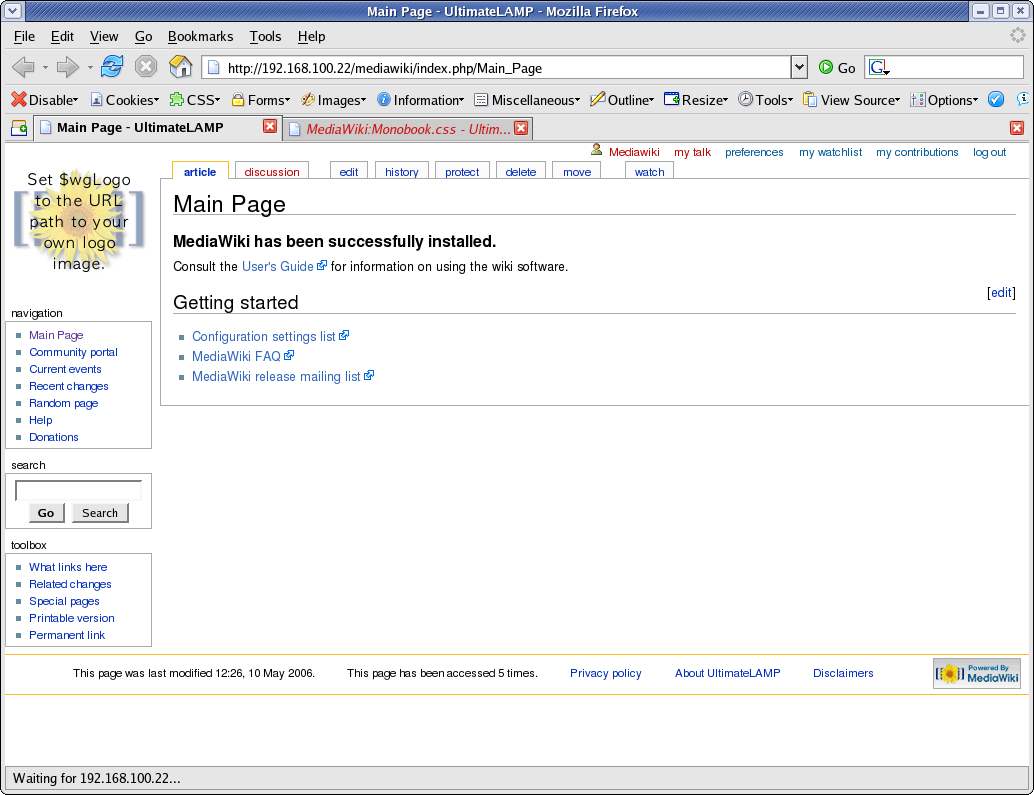
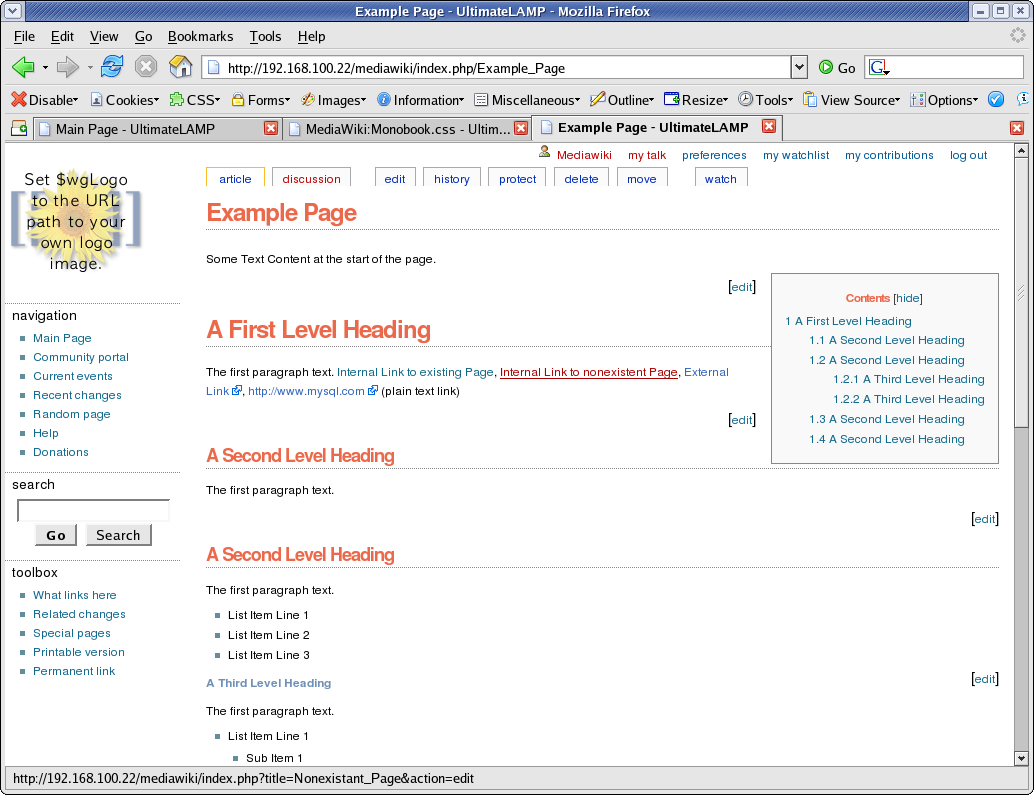
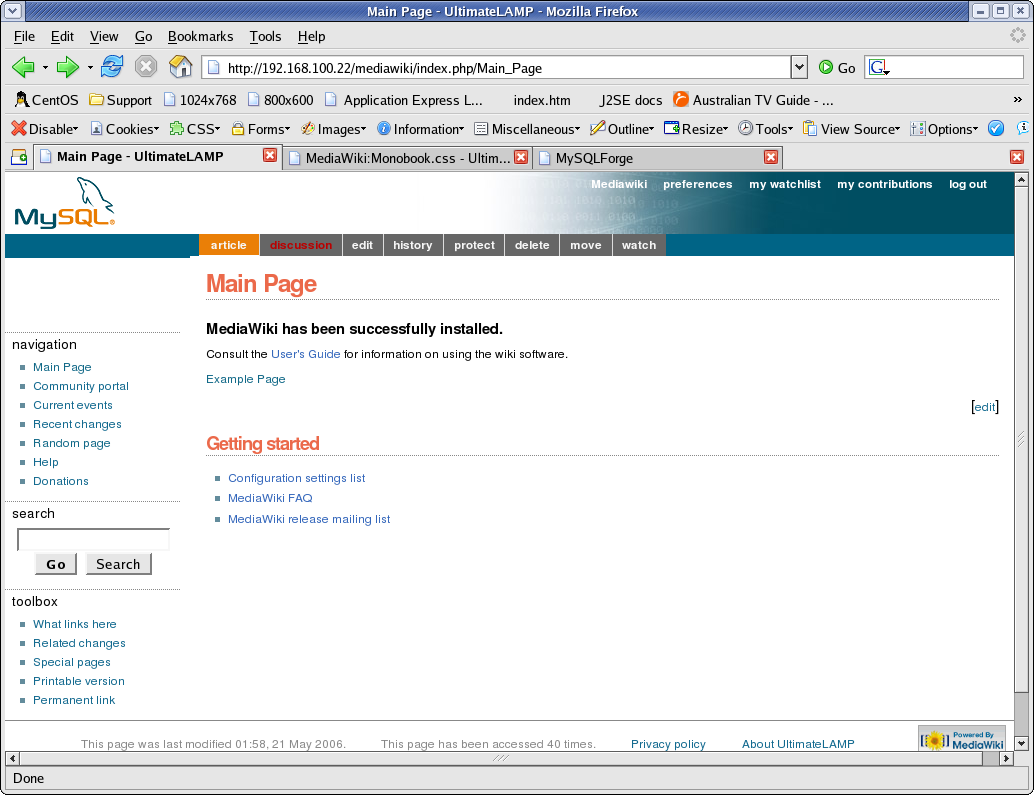
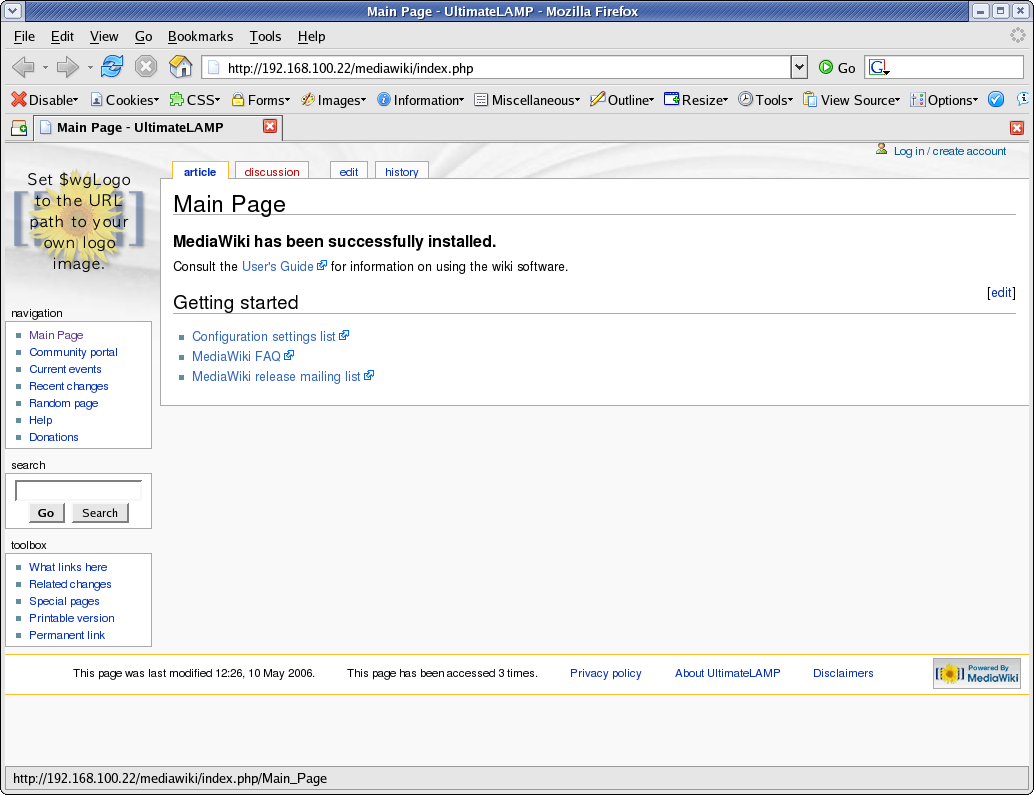
Following my implementation of UltimateLAMP, read heaps more at this thread, I undertook to provide customisations of a MediaWiki Installation. Here is the first lesson that you can undertake if you wish to beautify the default MediaWiki Installation.

For the purposes of this demonstration, I am going to help out Jay & Colin and propose a restyle the MySQL forge to fit in with the default Home Page. Hopefully you will see it there soon!

For the full lesson Read More Here

Lesson 1 - Updating the default Monobook.css

There are several different ways to make style changes, the simpliest is to customise the system wide Monobook.css, and this Lesson will focus on this.

By accessing the link [http://my.wiki.site/]index.php/MediaWiki:Monobook.css you will be able to make the following changes.

The best way to approach this, like any good programming style, make small changes, testing and confirmation and continue.

Note: For all screen prints, click for a larger image

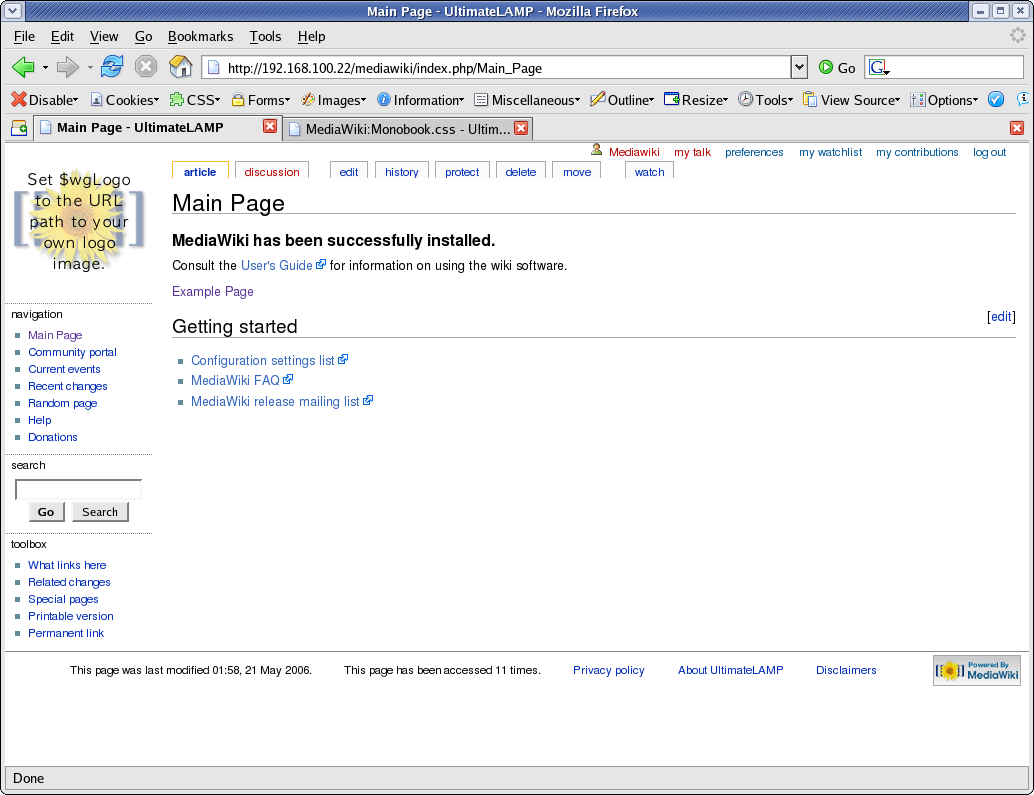
1. Cleanup Backgrounds

body        { background-image: none; background-color: #FFFFFF;}
.portlet    { background-color: #FFFFFF; }

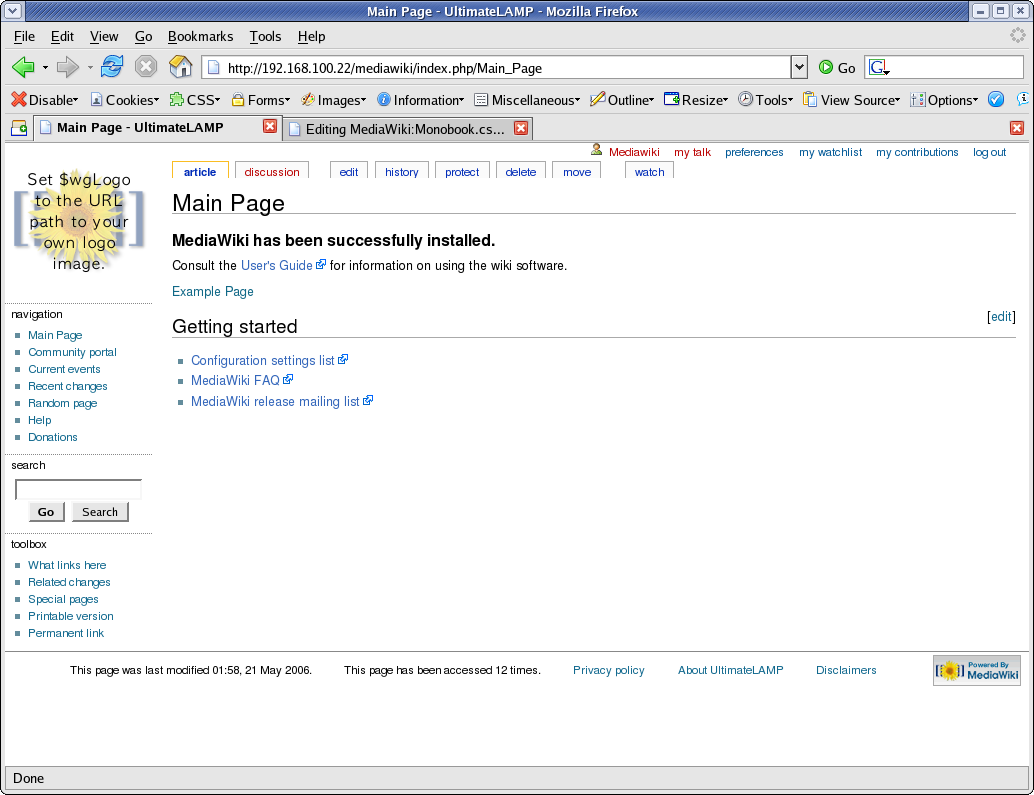
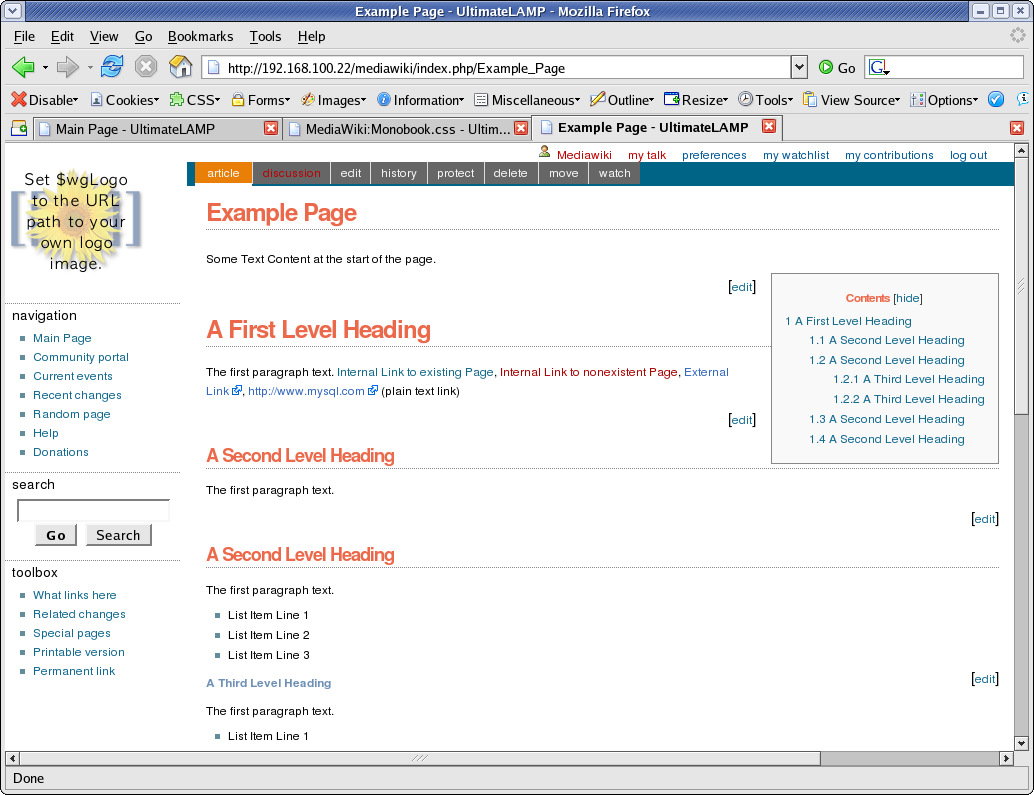
The MediaWiki Page is made up of three sections, these are the represented by styles .portlet, #content, and #footer. For the purposes of our first example, the content section and the footer section are already white.

==>

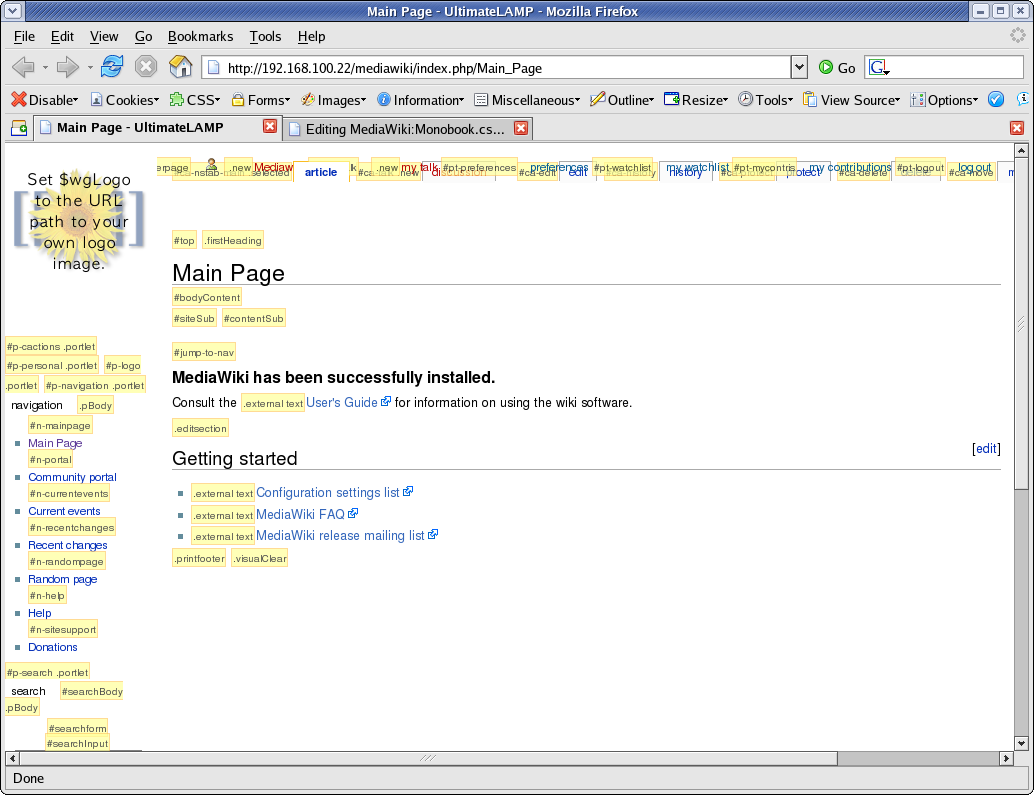
At this point I should recommend that you use FireFox for future work. You should then install the Web Developer Add-on. What results from this plugin is invaluable information about the internals of a web page. The two options most useful for this exercise is:

  • Information | Display Id and Class Details.
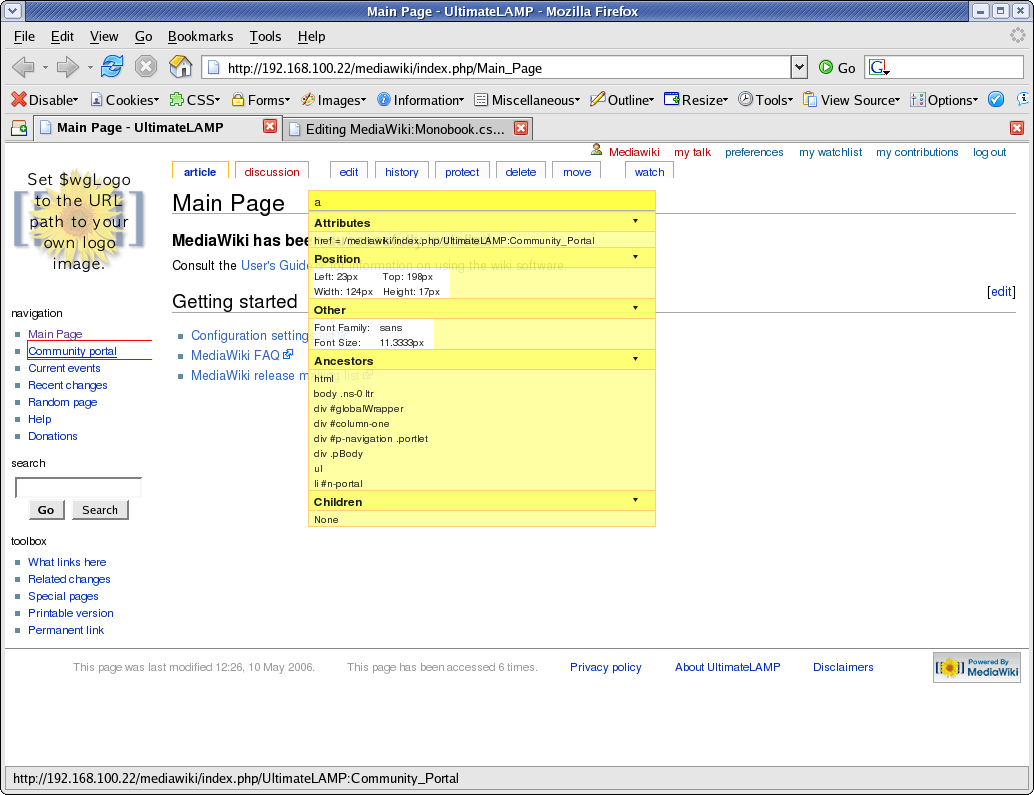
  • Information | Display Element Information (move the cursor around to get information)
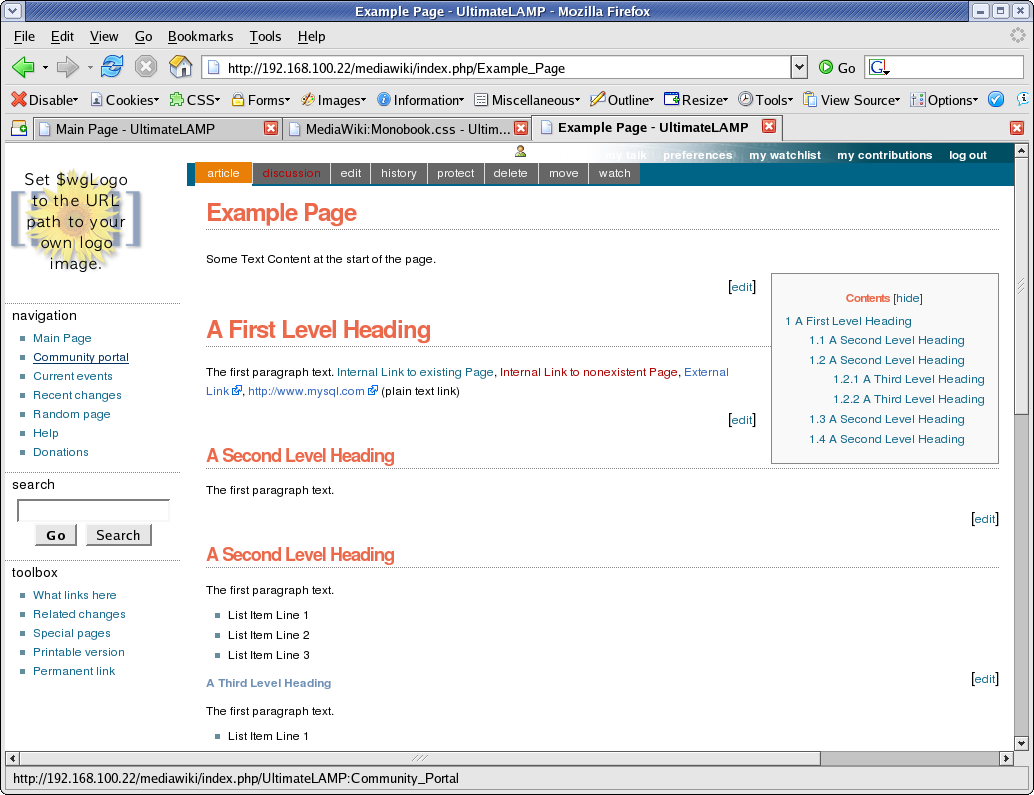
==>

For the full lesson and details on the following sections Read More Here.

2. Cleanup Borders
3. Links
4. Content
5. Table of Contents
6. Menu Options
7. Top Menu Options
8. Some Miscellenous Things
9. The Badging

Conclusion

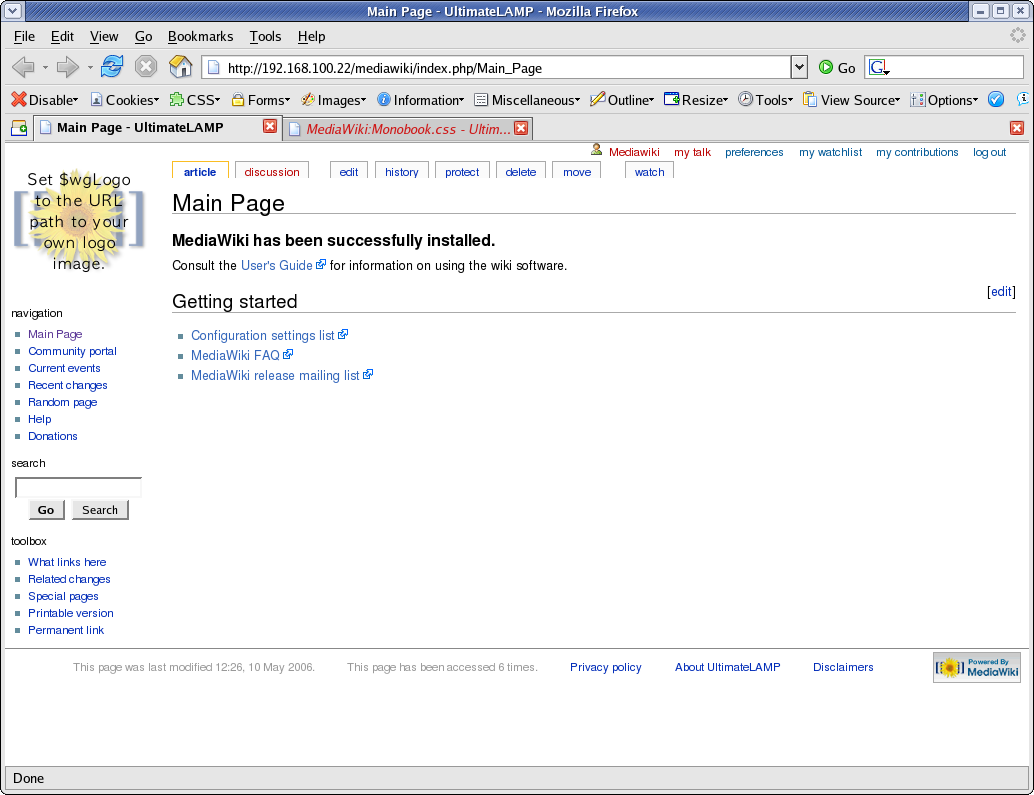
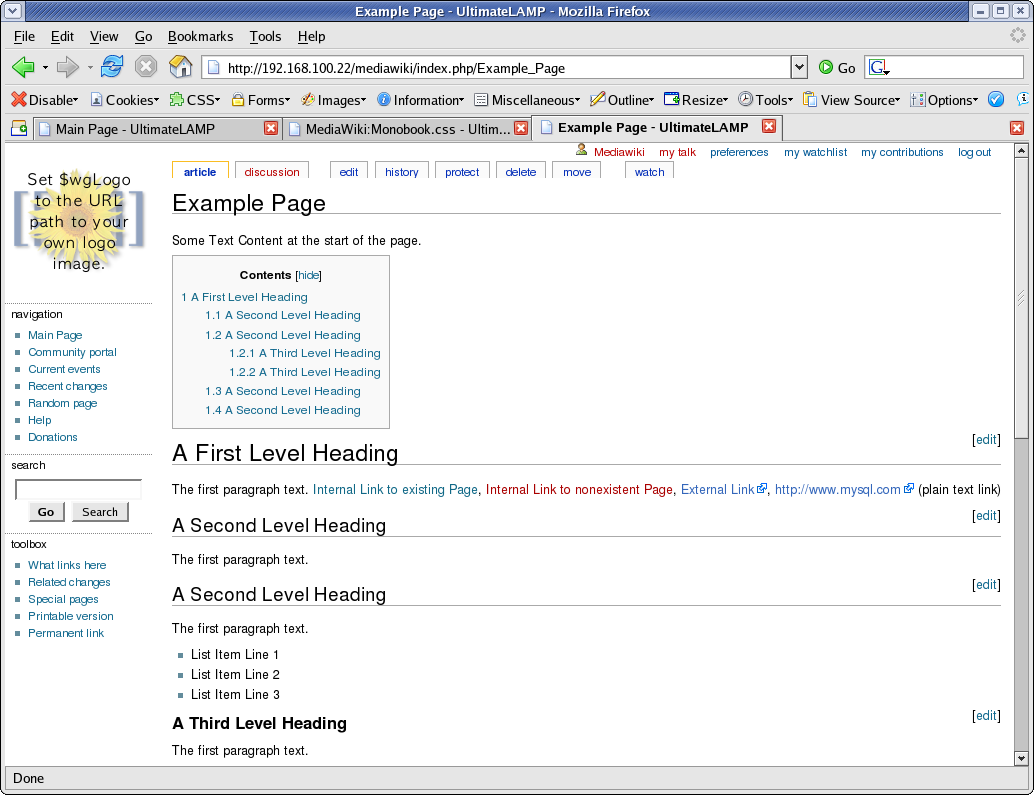
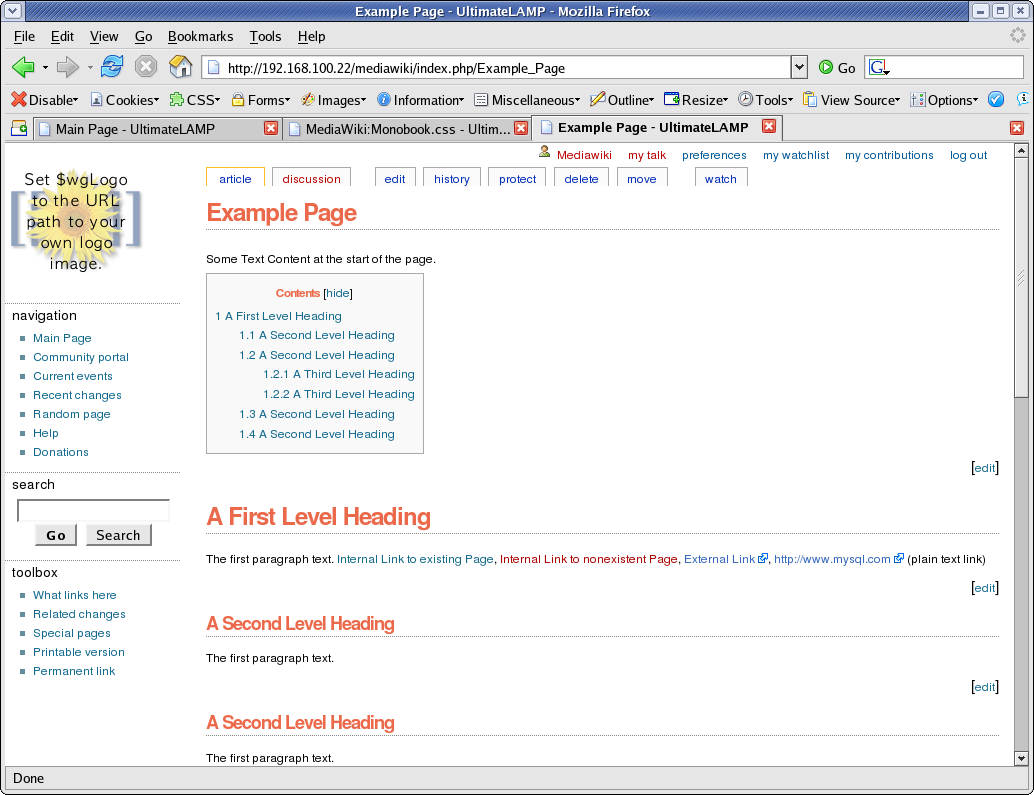
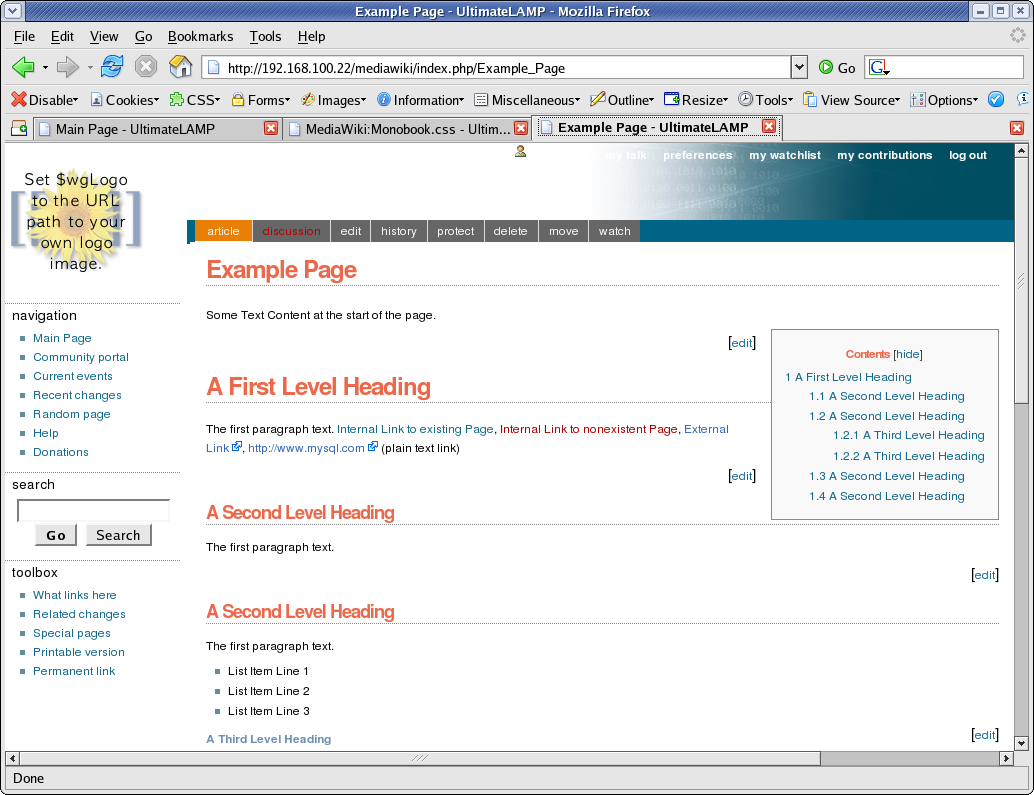
The End Result.

It’s not quite perfect yet, but this shows how it can be done. Some minor things are left, but I’ve run out of time for the few hours I allocated to this. The end result of monobook.css for this lesson is:

/* edit this file to customize the monobook skin for the entire site */

/* Background Display */

body        { background-image: none; background-color: #FFFFFF;}
.portlet    { background-color: #FFFFFF; }

/* Borders */

#content    { border-width: 0px; }
.portlet .pBody
            { border-width: 0px; }
#footer     { border-top: 1px solid #888888; border-bottom-width: 0px; }

#p-navigation,
#p-search,
#p-tb       { border-top: 1px dotted #888888; }

/* Links */
a:link      { color: #10688E; text-decoration: none; }
a:hover     { color: #003366; text-decoration: underline; }
a:visited   { color: #106887; text-decoration: none; }

a.new:link  { color: #AA0000; text-decoration: none; }
a.new:hover { color: #AA0000; text-decoration: underline; }

a.external:link {color: #000000; text-decoration: none; }
a.external:hover { color: #AA0000; text-decoration: underline; }

/* Page Look & Feel */
html,body,p,td,a,li
            { font: 12px/19px Verdana, "Lucida Grande", "Lucida Sans Unicode", Tahoma, Arial, sans-serif; }

h1          { font: bold 24px Helvetica, Arial, sans-serif; color: #EB694A; letter-spacing: -1px;
              margin: 1.5em 0 0.25em 0;
              border-bottom: 1px dotted #888888; line-height: 1.1em; padding-bottom: 0.2em; }

h2          { font: bold 18px Helvetica, Arial, sans-serif;  color: #EB694A; letter-spacing: -1px;
              margin: 2em 0 0 0;
              border-bottom: 1px dotted  #888888; line-height: 1.1em; padding-bottom: 0.2em; }

h3          { font-size: 12px; color: #6F90B5; }

h4          { font-size: 12px; color: #6F90B5; }

/* Table of Contents */
#toc        { float: right; margin: 0 0 1em 1em; border: solid 1px #888888; #EFEFEF; color: #333333; }
#toc td     { padding: 0.5em; }
#toc .tocindent
            { margin-left: 1em; }
#toc .tocline
            { margin-bottom: 0px; }
#toc p      { margin: 0; }
#toc .editsection
            { margin-top: 0.7em;}

/* Second Line Top Menu Options */

#p-cactions { padding-right: 0px; margin-right: 0px; background-color: #006486; width: 100%; }

#p-cactions ul
            { margin: 0; padding: 0; list-style: none;  font-size: 85%; margin-left: 10px; }

#p-cactions li
            { float:left; margin:0; padding:0; text-indent:0; border-width: 0px; }

#p-cactions li a
            { display:block;  color:#F7F7F7;  font-weight: bold;
              background-color: #666666;  border:solid 1px #DDDDDD;
              border-width: 0px;  border-left-width:1px;  text-decoration:none; white-space:nowrap;}

#p-cactions li a:hover
            { background-color: #FFBC2F; color: #66666; }

#p-cactions li.selected a
            { background: #EA7F07;  border:none;}

#p-cactions li.selected  a:hover
            { color: #000000; }

/* Top Menu Options */
#p-personal .pBody
            { background: #FFFFFF url(http://ultimateLAMP.arabx.com.au/images/bggradient.png) no-repeat top right; }

#p-personal li a,
#p-personal li a.new
            { color: #FFFFFF; text-decoration: none; font-weight: bold; }
#p-personal li a:hover
            { color: #E97B00; background-color: transparent; text-decoration: underline; }

/* Top Menu Height Adjustments */
#p-personal { height: 62px; }
#p-personal .pBody
            { height: 62px; }
#p-cactions { top: 62px; }
#content    { margin-top: 84px; }

/* Minor Things */
#footer     { color: #888888; }
#bodyContent a[href ^="http://"]
            { background:inherit !important; padding-right:inherit !important}
li#pt-userpage
            { background: none; }
li#pt-mytalk
            { display: none; }

/* Badging */
#p-logo, #p-logo a, #p-logo a:hover
            { width:100px; height: 52px; }
#p-logo     { margin-left: 10px; margin-top: 5px; margin-bottom: 5px; }

#p-cactions { left: 0px; }
#p-cactions ul
            { margin-left: 180px; }

References

User Styles Alternative
Gallery of user styles
Skins
LocalSettings.php Style Information
Navigation Bar
User Rights
Wikipedia Monobook
MediaWiki Skin HowTo

Posted under CSS, Databases, General, MySQL, Open Source, UltimateLAMP, Web Development on 26 May 2006
Comments (0)
May
26

GoogleWack

Link to this post

This fad started many years ago, and once I achieved it. Well today, I got the google 1 of 1 result. Here are the rules

GoogleWack “Your goal: find that elusive query (two words - no quote marks) with a single, solitary result!”

And my two words were:

ensureClassInitialized xmlbeans

Of course the problem is, by the time you read this, it may no longer be a 1 of 1 result, as my Blog may get referenced. So, I’ve attached a screen print for proof. (yes, it’s an undoctored screen print)

My GoogleWack Blog Entry.

Posted under General, Google on 26 May 2006
Comments (0)
May
19

UltimateLAMP

Link to this post


As I discussed earlier in A picture can tell a thousand words, I outlined briefly what the intention of UltimateLAMP was for. Let me spill the beans so to speak.

What is UltimateLAMP?

UltimateLAMP is a fully functional environment allowing you to easily try and evaluate a number of LAMP stack software products without requiring any specific setup or configuration of these products. UltimateLAMP runs as a Virtual Machine with VMware Player (FREE). This demonstration package also enables the recording of all user entered information for later reference, indeed you will find a wealth of information already available within a number of the Product Recommendations starting with the supplied Documentation.

My executive punch line with the “right” buzz words is:


You have heard of all the hype in Open Source with lowering Total Cost of
Ownership (TCO) or Total Economic Impact (TEI)? Evaluate Open Source now
in your organistion at no cost or risk with this software package.

What are the uses for UltimateLAMP?


Well, in a nutshell UltimateLAMP allows for instant exposure of Open Source products that use MySQL. You have to remember my goal here is to promote MySQL. Unfortunately, as with any database the features alone will not get the new sale, it’s the applicability to an organisation, and with Open Source the wealth of existing and developing applications that exist can. I don’t necessarily like this approach. Indeed many open source products are poorly designed and can be poor choices in a large scale enterprise solution, but the flip side is, where else can you start.

The benefits of selling a MediaWiki for example due to the success and scalability with Wikipedia is great. So it’s important that the product list includes proven products and currently developing products (rather then stale ones). This is something that the community can definitely provide valuable feedback on to help in this selection.

Other then becoming a CD used as a drink coaster, I feel the potential is here already to provide a copy to people, even install it on a managers computer. You can’t break the software, so why not install it for your non-computer user friends/family. The goal is to move up to executive management however I feel the exposure to the general community first will greatly help.

How it came about

There is some history to this idea. Here are some of the highlights.

  • Late 2005, several planning sessions with Jon and Morgan about a more practical Open Source Contribution user group lead to obviously LAMP stack products for simplicity and exposure. This lead to exposure of LAMP stack products to more of the general person and split from the original intended goal, but was a great idea.
  • Early 2006, futher discussions of how MySQL could get exposure and traction into organisations. For myself professional, how could I promote in industry sectors that I work in.
  • In April 2006, the MySQL Users Conference with discussions of this idea with others and the positive feedback
  • In May 2006, the VMware Appliance Challenge was the possible exposure and deadline needed for me to “Just Do It”. Originally the idea was intended as a Live CD, but in some ways a virtual machine is just as good.

Where to from now!

Well, supply and demand. I don’t know if anybody else has a particular use, or will even download to use it, or market it.

I could see the potential for MySQL User Groups to get behind my idea, and enable members to filter this into known organisations. I could see for targeted opportunities/events, CD’s or information could be distributed. With the support and backing of MySQL AB, I could see the opportunity for even a breakfast CEO/CTI/CIO introduction or other format of meeting the ultimate intended audience.

I could see the potential that an organisation or entity could provide free hosting (30 days) to an organisation that pointed a 3rd level domain to the provider (e.g. wiki.acme.com). It’s like the honeypot, if it takes off after 30 days, the company will either want to pay for hosting, or what to move it. And that’s also fine, organisation provides a MySQL dump, and links to documented installation instructions, or perhaps a sale of services for initial installation/customisation/training can be made.

What can I do?

There is always a list of things that can be done. For now the greatest thing I can ask for is feedback. The good, the bad and the ugly. It’s find to get the comments to say, “That’s great”, or “Good job” or “I can use this”, it’s just as important to get the comments that are proactive in what’s not good. I would value any feedback. Please feel free to Download UltimateLAMP

On my immediate ToDo List or even partially complete is:

  • Document VMPlayer installation instructions for Windows/Linux (partial).
  • Add more product sample content.
  • Add more mediawiki content about the product, like customisation options, references to specific documentation, or other online working examples.
  • Documenting the installation/creation instructions for individual products.
  • Figure out a better way for users to contribute content that get’s rolled back into the Virtual Machines. For the mediawiki, I could see a public online copy, but for other products it could become harder
  • Optimise VM image (removing unnecessary OS stuff), removing product language support (not ideal), but my goal is to provide a 2 CD pack. The first CD has VMplayer in Win/Linux/RPM formats and the default VMware BrowserAppliance (All software from VMWare). The second CD is UltimateLAMP. Combined in a DVD 2x case along with perhaps a small booklet of a few pages, would enable this product to potential move to a commercial state.
  • Investigating other products

Should anybody wishing to help, leave a comment, that way I can see somebody is reading this and so can others.

Posted under Databases, General, MySQL, Open Source, UltimateLAMP on 19 May 2006
Comments (10)
May
19

Unbelievable Bureaucratic Incompetence

Link to this post

Some times I’m just disgusted to be involved in the IT Industry, due to the incompetence of others that then reflect poorly on everybody else.

In this case at a present client, a new company wide email implementation using Microsoft Outlook as the Email Client and most likely Exchange Server is occuring. It has been for some time, there have been several delays and a lot of problems!

A particular user’s email address has been configured with an asposthe (’). Now practically anybody with any system admin experience knows that an email address cannot contain this characters. Ok, well it’s not that bad, just correct it.

But what typifies this incompetence, is the rollout was done by IBM, not some new system admin that may have made a honest mistake. We are talking about a professional organisation that provides IT services. Ok, well let’s just say again it was a simple mistake, the bureaucratic side of my comment comes from the fact that the organisation where this email rollout was deployed has no ability to correct the problem (how can this be possible), and the resultant request made to the implementation company IBM, now wants to charge for the correction of there own incompetence.

The irony is I was the person that discovered it in a site wide rollout, and I only found it by doing a reply to an email (which is a common practice normally). Where was the checks and balances by all the people that have been involved in the process for sometime, and are supposed to be the experts? Where was the quality?

As I mentioned at the start of my post, I’m disgusted.

Posted under General, The Daily WTF on 19 May 2006
Comments (0)
May
19

A picture can tell a thousand words

Link to this post

I’m a keen advocate of MySQL. However, while I use it and promote it within my limited IT circles, I often wonder how MySQL can get better traction and exposure, especially within both the industry sectors and physical locations where I am presently.

This presents a dilemma, it’s almost like the term that has been used in Venture Capital, and in the well named book, Crossing the Chasm. I see and believe that MySQL already has good penetration within certain industry sectors, specifically Internet Based, Startup Based, or Small Based segments. However, I’m sure within other commercial sectors, MySQL has either a token exposure or little to no exposure at all, at least in the circles I mix with.

So how can MySQL the product and MySQL AB the company get both better exposure and penetration? Ultimately it’s great for the community, both in dollars driving product features, product support and from my interest, more jobs. I figure there are many different approaches, and they all target organisations, and the individuals making decisions within the organisations differently. You have the 24×7 support with MySQL Network and certified installations that can satisfy management, you have the speed, flexibility, performance and capability that can appeal to a DBA. But this I doubt is the ultimate hurdle.

How do you do the active sell in 60 seconds to a potential cold contact, or how do you as an MySQL Open Source advocate within an organisation do the active or passive sell to a CEO/CTO/CIO/IT Manager etc.

Well I have an idea, it’s called UltimateLAMP. It’s not the ideal solution, it’s not the great sell, but I figure it’s one approach that I can contribute to and promote.

Stay tuned, more to come very soon.

Posted under Databases, General, MySQL, Open Source, UltimateLAMP on 19 May 2006
Comments (0)
May
19

MySQL GUI Products

Link to this post

I’ve started now to actively use more of the MySQL Workbench, MySQL Administrator and MySQL Query Browser and MySQL Migration Toolkit. I am traditionally a very command line person, and it’s important that these skills are never put on the back burner. For all those budding Developers and DBA’s you need these skills, expecially for any MySQL Certification.

To indicate my indent, I’ve even created a new blog category specifically for MySQL GUI Products.
As I’ve mentioned previously, Mike Zinner from MySQL AB really impressed me with where the products were going in development. I’m still rather disappointed about the stability and compatibility when attempting to run under Linux (which is my desktop), but I’ve put that aside and configured a suitable environment to best use and test these products under Windoze! I’ll also be able to trial products under both environments and provide valuable feedback to Workbench Bugs.

To overcome this, as I use Windows reluctantly in a VMware environment, I’ve decided to install all MySQL GUI Products on an older laptop (a Dell Inspiron 5000, PIII 600MHz), which I use for media playing (DivX .avi’s) on my TV. Yes, I hate to resort back to windows, but I had difficulties getting the TV Out working properly under Linux, and I only have so much free time. I would have liked to nut it out, but I find Windows superior in only 2 things, driver compatibility and running Photoshop, so I’ll leave it at that.

So being about to VNC to this machine gives me a spread of processing usage which is acceptable for now, and I’m working from a single desktop. (Time to dream some more about that Dell 24″ UltarSharp Widescreen LCD Flat Panel I’d like).

Well again, with just starting MySQL Workbench, and for the first ever time launching MySQL Administrator I came across Windows functionality I’d not seen before. Within MySQL Administrator under the Windows menu option I was able to switch to MySQL Workbench, a completely different running Windows Program. Now, I’d not seen this before in any multiple running products in Windows. Obviously the power of the GRE enables this, what a nice feature. Well back to now looking at this product some more.

Posted under Databases, GUI Products, General, MySQL, Windoze on 19 May 2006
Comments (0)
May
19

WordPress Blog Upgrade Time

Link to this post

Time to Upgrade my WordPress Blog software from Version 1.5.2 to Version 2.0.2 after my latest spam attacks and Combating Blog Spam attempt.

Here is what I did.

cd /home/arabx/www
tar cvfz blog.backup.20060520.tar.gz wordpress-1.5.2
mysqldump -uroot -p arabx_blog > blog.db.20060520.sql
mv blog.*20060520* /u01/backup   # Not in my WWW
scp blog.*20060520* to@someplacesave:/backup
wget http://wordpress.org/latest.tar.gz
mv latest.tar.gz    wordpress-2.0.2.tar.gz # I really hate unversioned files

Disable Plugins. You had to do this manually from the Admin interface (I’m sure it’s just a SQL statement).
Goto http://blog.arabx.com.au/wp-admin/plugins.php

Now some more work.

tar xvfz wordpress-2.0.2.tar.gz  # creates a wordpress directory
mv wordpress wordpress-2.0.2
ln -s wordpress-2.0.2 blog
cp wordpress-1.5.2/wp-config.php wordpress-2.0.2

Back to the Web page again. So much for unattended upgrades?

http://blog.arabx.com.au/wp-admin/upgrade.php

Follow the Steps (step actually). That all worked, now to restore all the additions?

cp -r wordpress-1.5.2/wp-content/themes/arabx wordpress-2.0.2/wp-content/themes/
cp -r wordpress-1.5.2/wp-content/plugins/eventcalendar3* wordpress-2.0.2/wp-content/plugins/

Reactivate my plugins at http://blog.arabx.com.au/wp-admin/plugins.php
Change to my Theme at http://blog.arabx.com.au/wp-admin/themes.php

So my blog page http://blog.arabx.com.au/ looks much like it did previously. Time now to review some of the new features and plugins, expecially steps to combat spam.
References
WordPress Official Upgrade Page
Upgrade to WordPress 2.0
What’s New in WordPress 2.0?

Posted under General, MySQL on 19 May 2006
Comments (0)
May
18

MySQL :: Developer Zone Quick Polls

Link to this post

I don’t get to the MySQL Developer Zone main page often enough. In thinking about what pages I view everyday or regularly, it doesn’t rate as high as Planet MySQL, MySQL Forums or even the MySQL Forge.

I was most dissappointed in the results of a recent poll What did you think of the 2006 Users Conference?. The top response was I had no idea there was a Users Conference. That’s not good to see this.

An interesting poll What are you most looking forward to at the MySQL Users Conference (April 24-27)?, the clear winner was Drinking beer with MySQL gurus. What does this say about the attendees. Either they are all alcho’s or the just want to be around guru’s in a less technical way.

I see this page also has a live feed of Planet MySQL. Perhaps we should get some more stuff down the right side of PlanetMySQL like the current Quick Poll itself and a feed of the current developer articles at the Developer Zone.

Posted under Databases, General, MySQL, mysqluc06 on 18 May 2006
Comments (0)
Newer Posts »
Home
Professional Blog RSS Feed of Professional Blog
Consulting
Presentations
About Ronald
Related Links
Contact Ronald
  • « Apr spinner iCalendar Jun »
    May 2006
    M T W T F S S
    1234567
    891011121314
    15161718192021
    22232425262728
    293031EC
  • Categories:
    • Professional
      • 42SQL
      • Apple
        • iPhone
        • MacBook
        • OS/X
      • Clever Design
      • Cloud Computing
        • 10gen
        • AppNexus
        • Kaavo
        • Kloudshare
      • Databases
        • Drizzle
        • Ingres
        • MySQL
          • Compiling
          • GUI Products
          • MySQL Events
            • mysqlcamp01
            • mysqlcamp02
          • MySQL Proxy
          • MySQL User Conferences
            • mysqluc06
            • mysqluc07
            • mysqluc08
          • Storage Engines
            • Non Transactional
              • Infobright
              • KickFire
              • Maria
              • Nitro
            • Transactional
              • Blob Streaming
              • Falcon
              • InnoDB
              • PBXT
              • Solid
        • Oracle
      • Extreme Programming (XP)
      • General
      • Java
        • Tomcat
      • Linux
        • One Liners
      • Microsoft
      • Open Source
        • Buildbot
        • Ubuntu
        • UltimateLAMP
        • Virtual Box
      • OSCON 2008
      • PrimeBase Technologies
      • Solid State Drives
      • Sun
      • The Daily WTF
      • Windoze
      • Yahoo
    • Web
      • Google
        • App Engine
        • Summer of Code
      • Web Development
        • Amazon
          • EC2
          • S3
          • SimpleDB
        • CSS
        • HTML
        • PHP
        • Web 2.0
      • Web Sites
        • Application Software
        • Content
        • Cool Tools
        • Linux Stuff
        • MySQL Related
        • Show Your Stuff
        • Twitter
        • Unype
      • WordPress
  • Pages:
    • Best Of PlanetMySQL Articles
    • Interesting Articles
    • MediaWiki Restyling (1)

  • Archives:
    • August 2008
    • July 2008
    • June 2008
    • May 2008
    • April 2008
    • March 2008
    • February 2008
    • January 2008
    • December 2007
    • November 2007
    • October 2007
    • September 2007
    • August 2007
    • July 2007
    • June 2007
    • May 2007
    • April 2007
    • March 2007
    • February 2007
    • January 2007
    • December 2006
    • November 2006
    • October 2006
    • September 2006
    • August 2006
    • July 2006
    • June 2006
    • May 2006
    • April 2006
    • March 2006
    • February 2006
    • January 2006
    • December 2005
    • November 2005
    • October 2005
    • September 2005
    • July 2005
    • June 2005
    • February 2005
    • October 2004
    • September 2004
    • July 2004
    • June 2004