Ronald Bradford
MySQL Expert

MySQL Expert Ronald Bradford shares valuable input in MySQL Performance Tuning, MySQL Scalability and general MySQL Help from his two decades of working with MySQL, Oracle, Ingres and development technologies.

Archive for the ‘iPhone’ Category

When technology just works

Sunday, March 30th, 2008

Today I needed to visit a medical specialist for collection of something. I had to pay $250 as my insurance did not cover. I sent a check as requested however today they had not record of receipt. Not wanting to write a second check and then find they cash both, I logged onto my online banking right there with my iPhone (miracle I could remember my login and password as all important logins like this are different and normally I need my notes) and I’m able to confirm deposit and even view a scanned copy of the check. Confirming the date they are still unable to find. I’m able to use an office computer and print out this confirmation to show them proof of payment.

The technology of the iPhone and the thoroughness of my bank online check verification solved the hassle, simplified the confirmation and greatly reduced the stress of the situation. At T-2 days the technology worked and I was most grateful.
iPhone bug

Thursday, November 22nd, 2007

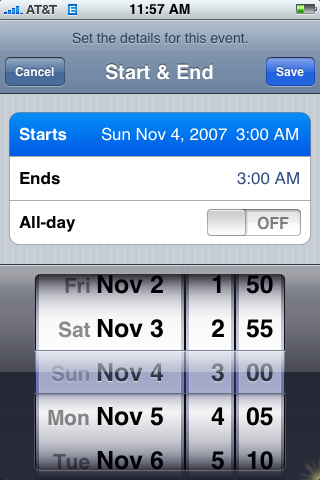
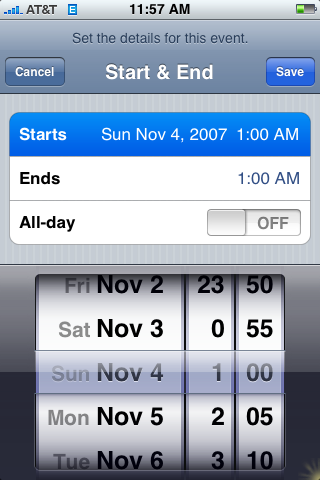
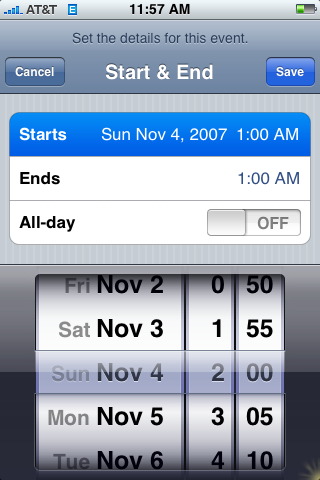
I discovered a bug on my iPhone. The issue was around Daylight saving. Thanks to Dock I was able to take screenshots which was much better then photos.

In Calendar when you select 1am on the scrollers, you get 1am as the start time. When you select 2am, the start time goes to 1am. When you select 3am, it goes to 3am as expected.


My Hacked iPhone

Thursday, November 22nd, 2007

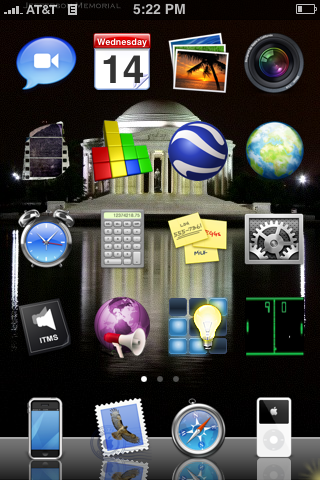
I installed Dock on my iPhone and it gave a very handy and wanted Screen Shot function. So now I can show my present iPhone screen. It looks like:

Apart from the obvious differences of different and more icons, I have by background behind icons, and I’ve turned off the text, so you need to know the icon means. Still, it’s wicked cool.

My MacBook

Monday, November 19th, 2007

I arrived home last night at midnight from San Francisco to a pile of mail and a number of packages. My shiny new MacBook had arrived. It was rather ridiculous that I wanted a HDD upgrade and I could no buy it in the store. They come with 160GB and have only one upgrade option to 250GB.

Nevertheless, I’m now trying to familiarize myself with Mac OS/X 10.5 (Leopard) which is rather foreign as I’ve never used a MacBook before.

So what was my motivations? After Hacking my iPhone I wanted to do more, and even try and write an app, so I needed a Mac OS. I actually wanted a MacBook when I first joined MySQL last year, but my request was not approved (”You have to be able to run Windows” was the response, and yes I told them it can run windows).

Combined with a my Q3 Bonus, I just had to have one. This has been a number of significant purchases in recent months, an iPhone and a Canon 40D. All I need now is a girlfriend and my bank balance will be in more serious trouble.

Hacking my iPhone

Saturday, November 3rd, 2007

I’ve finally taken the plunge after wanting to for some time. This is what I did, all steps are from using the iPhone directly, no computer required.

NOTE: I can’t take responsibility for anything that happens to your iPhone. As the warning for the installer program states, “This software comes with absolutely no warranty of any kind. If it should cause any harm to your iPhone or data, we shall not be held responsible.”. That said, there are instructions to Virginizing your iPhone to 1.0.2. So if you ever had to return the phone to Apple you would need to do this first.

Part 1. The Installer
NOTE: This only works if your Phone has firmware Version 1.1.1. If you have the iTunes button you have 1.1.1 (as at 01-Nov-2007). You can find our your Version by going Settings -> General -> About and look for the Version value.

1. Disable Keyboard Passcode Lock if enabled (Settings -> General -> Passcode Lock -> Off), Disable auto-lock (Settings -> General -> Auto-Lock -> Never), enable Wi-Fi (Settings -> Wi-Fi -> On) and get connected to a wireless network (Settings -> Wi-Fi -> Join Network)
2. Using Safari Browser, goto http://jailbreakme.com/.
3. Click on Install AppSnap link. The phone will appear to do nothing before it returns to the initial screen, with Slide to Unlock. (It took less then a minute for my iPhone to go back to Slide to unlock, other notes indicate up to 5 mins)
4. Slide to unlock. You will see a new icon called Installer. (Don’t click it yet)
5. Power off your phone, and power back on. (I’m uncertain how long this will take, as I did it slightly different, but don’t be alarmed if it takes at least 15 minutes this first time, as that what it took for me.

Note: At step 4 I selected the Installer button (it asked me to Update, which I did). This was bad idea, it went to Downloading package and never recovered after 5 minutes. I needed to do a reboot via holding down menu button. Click on the Installer button again, and it simply doesn’t start properly, going back to the main page. Turning off via power button freezes as well. After 5 minutes, tried holding down first the menu button, then the power button, no luck. Froze on the shutdown spinning icon for at least 15 mins.

Part 2. The Necessary Programs

You can now install the following programs when selecting Installer. Note: after each installation it will go back to the initial slide to unlock screen.
Note also the initial order, in particular the first 3 are important.

6. Installer -> System -> BSD Subsystem (Version 1.5, 6.6 M)
7. Installer -> Sources -> Community Sources (Version 3.0, 165 bytes) Update This happens automatically now.
8. Installer -> System -> OpenSSH (Version 4.6p1-1, 696k)
9. Installer -> System -> Term-vt100 (Version svn198, 81k)
10. Installer -> Package -> Summerboard (Version 3.0a11, 693k)

This then gave me access to SSH to my phone, SSH out to the big bad world, and ability to have different themes, changing the look and feel, see Summerboard themes for example.

Part 3. The fun applications.

I installed to start with the following application, you should choose what you like.

Installer -> Games -> Sudoku (Version 1.0-1, Size 24k)
Installer -> Utilties -> Erica’s Utilities (0.36, 42k)
Installer -> Utilities -> Erica’s iPhone Utils (0.06, 12k)
Installer -> Utilites -> Erica’s Ported Utils (0.06, 2.5M)
Installer -> Multimedia -> VoiceNotes (0.21, 60k)
Installer -> Productivity -> Crosswalk (1.01, 362k)

Practically everything is from www.modmyifone.com. Many references available online helped including here. Thanks James for the demo and points to success.

Some darn wicked stuff.

One of the cool things, being able to save Call History, SMS messages and Notes. Did via SSH with the following commands:

PATH=/var/root/bin:$PATH;export PATH
sqlite3 -line /private/var/root/Library/SMS/sms.db 'select address,text from message;'
sqlite3 -line /private/var/root/Library/Notes/notes.db 'select data from note_bodies;' | sed "s/^.*data = //"
sqlite3 -line /private/var/root/Library/CallHistory/call_history.db 'select "* " || address || " (" || ((duration/60)+1) || "  minutes)" from call;' | sed "s/^.*= //"

Ban the Backquote

Saturday, October 20th, 2007

I really don’t like the backquote character (`). This is primarily due to it’s use by MySQL in internal and community tools.
MySQL allows objects, .e.g table names, column names etc to contain both reserved words and spaces, providing they are appropriately surrounded by backquotes, so tools now simply enclose everything with backquotes. Really annoying.

Last week while on a client site I was told a funny story. The CEO of a company bought an iPhone however was unable to use it at work due to the WEP key for the Wireless access in his organization includes a backquote. I’ve confirmed it, the iPhone keyboard does not have a backquote key. So now, because he is the CEO, everybody will have to change their Wireless WEP key just because of the iPhone.

But it gets better. Around midnight last Saturday between Slate Plus (for Dinner & Pool) and going down to SOHO for more drinks, Farhan had to change a cron job. As his battery was running low, he was trying to find it, you guessed it, the backquote character on his OQO. Just lucky it’s Windoze and if you can find the character map application, you can insert the character.
Rob and Michelle were on hand, and with my new EOS 40D and 50mm 1.4f lens I was able to take a series of photos without flash and without alerting my unsuspecting subjects.

My iPhone Bill

Sunday, August 19th, 2007

Today I got back home to my iPhone bill. Lucky for me it was only 15 pages long. Rather stupid, but this news has been circulating for a few days. You can read More Google News stories including creative titles like “How many trees did your iPhone bill kill?”, “A 300-page iPhone Bill?” and “iPhone: The 800-Pound Gorilla Spawns a 300-Page Bill”. Not only did they waste trees, but I read one article stating it cost AT&T $7 in postage for one bill.

The present news is that the only way AT&T will address this is if you accept to get a paperless bill. How stupid, how about they just not print every data transfer, it’s not like you can actually get on a data plan that’s not unlimited anyway.

The iPhone Safari Browser

Sunday, July 15th, 2007

One of my photo websites www.ronaldbradford.com doesn’t work properly on the iPhone under Safari, but it works under Safari on Mac OS/X. Problem is, there is no debugging options and I see no way to workout why DOM compliant Javascript doesn’t work!

Cool Product – OQO

Sunday, July 15th, 2007

My flatmate just go an OQO and he hasn’t stopped raving about it.

A small PDA type device, however it runs a full version of Windows XP, has a full keyboard, mouse and keypad, a screen of 800 x 480 and build-in Wi-Fi and wireless broadband that can be connected to a telephone provider. Apparently with Skype installed you could then use it as a phone. He just tested it as we were talking to see if it had a built-in mic. I must admit even I’m impressed. Something I’ll need to play with a little more. Doesn’t beat my iPhone however for the cool alpha geek, in your pocket sized being able to show my photos & view the web device.

Other iPhone experiences for corporate users

Wednesday, July 4th, 2007

I am not alone in my experience as a corporate AT&T/Cingular user wanting an iPhone. See my last post iPhone activation – Finally after 3 days. In the past 30 minutes I’ve read the same pain from many people. How can Apple and AT&T get this so wrong?

Some posts of interest:

No iPhones for corporate accounts?!
Anyone else here on an AT&T corporate account?
Apple, er AT&T, tells corporate types to pound sand
No iPhone for business account customers at launch?