I recently had the pleasure of presenting Planning your upgrade to MySQL 9.7 at COSCUP 2026 in Taipei, Taiwan. COSCUP (Conference for Open Source Coders, Users and Promoters) is one of the largest open source conferences in Asia, and the community there is always engaged and technically sharp.
The slides are now available on Speaker Deck , and you can find the session in the COSCUP 2026 schedule .
The session
The recent release of MySQL 9.7 Long Term Support (LTS) community edition joins MySQL 8.4 LTS as the two current LTS releases. The popular and widely used MySQL 8.0 has now reached end of life. Organizations running MySQL 8.0 should be migrating to MySQL 8.4 and evaluating the roadmap of features and capabilities of the new MySQL 9.7.
In this session, we took a deep dive into the new capabilities shipping in MySQL 9.7 Community Edition: full DML support for JSON Duality Views, the Hypergraph Optimizer, JavaScript stored procedures, enhanced security management, and a number of Enterprise-only components now available to all — including replication observability tools and OpenTelemetry-based telemetry integration.
The talk focused on how to responsibly evaluate and test a major version release before production deployment. We walked through a practical checklist covering compatibility assessment, workload testing, staged rollout strategies, and rollback planning to help:
- Developers integrating new features into application workflows
- DBAs managing the migration and monitoring behavior changes
- Engineering leadership weighing the timing and scope of the upgrade
Attendees left with a better understanding of MySQL 9.7’s most impactful features and a strategy they can take directly back to their team to evaluate them.
The upgrade path many teams observe
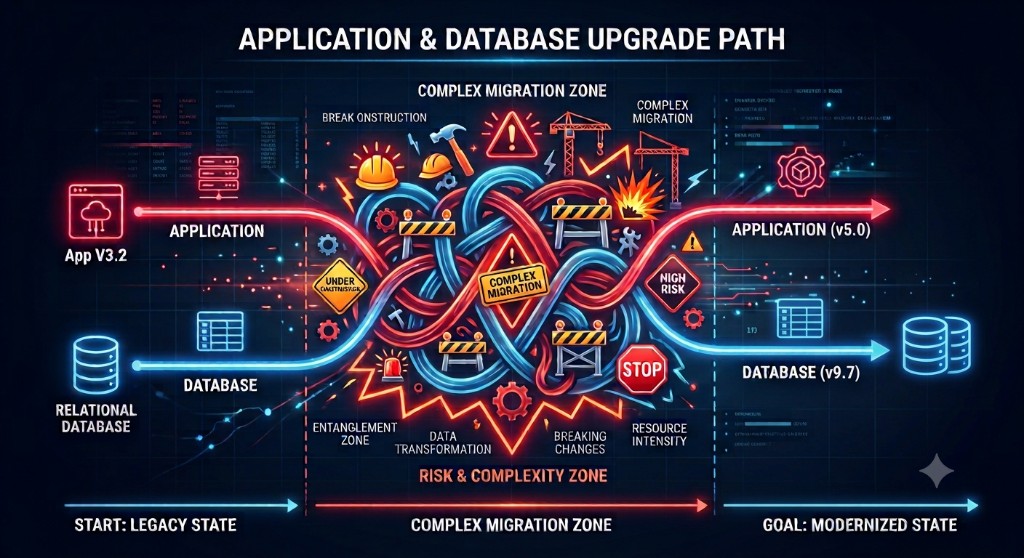
The hero image above captures what an upgrade too often looks like in practice. The application and the database are upgraded together, in a single high-risk leap, straight through a “complex migration zone” of entangled dependencies, breaking changes, data transformation, and resource-intensive rework. When everything moves at once, a single problem — a removed feature, a changed default, an authentication or character set issue — can stall the entire effort with no clean way back.
The most common problems I see repeated across upgrades are consistent, and rarely about the headline features:
- Character sets (for example,
utf8now deprecated in favour ofutf8mb4) - User authentication changes (such as the removal of
mysql_native_password) - Performance regressions that only appear under production workload
- Deprecated features that have now been removed
- Reserved words and legacy third-party integrations
Because these surface late and all at once, the “big bang” path is where upgrades go to fail.
A more staged, seamless path
The alternative is to decouple the work and move through it in deliberate, reversible stages, keeping the application and database migrations on their own tracks so each change can be tested and, if needed, rolled back independently.
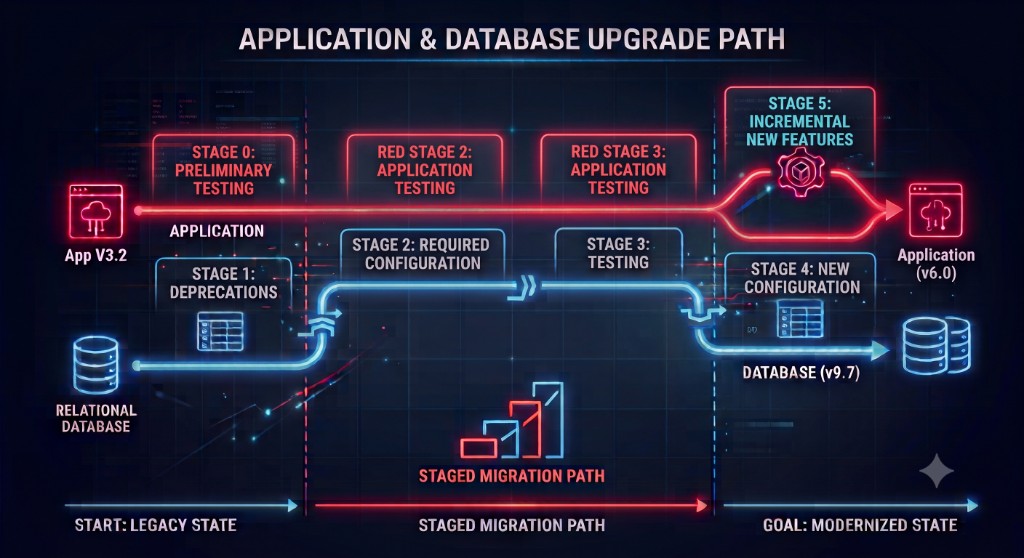
Rather than one leap, the upgrade becomes a sequence of smaller, verifiable steps — preliminary testing, addressing deprecations, applying required configuration, testing, adopting new configuration, and only then incrementally enabling new features. The techniques that make this work are the heart of the talk:
- Prepare — read the release notes for every version between your source and target, and research the known issues before touching anything.
- Plan — document each step and decision, know your integrations, system owners and data stewards, and agree in advance who makes the go/no-go and rollback calls.
- Test, test, test — compare every SQL statement pre- and post-upgrade, watch replication lag, and measure end-to-end engineering time for any query changes.
- Separate new features from the version upgrade — treat “run on 9.7” and “use 9.7’s new capabilities” as distinct milestones. The Hypergraph Optimizer, for example, is disabled by default so you can adopt it safely and independently after the migration.
- Use feature flags — be able to revert a change dynamically, without a redeployment.
- Roll out incrementally — ramp read load through 1%, 2%, 5%, 10%, 25% rather than switching everything over at once, and stop what can be safely stopped (such as batch jobs) during the transition.
- Monitor — capture detailed usage patterns before the upgrade so you can explain changes in normal workload afterwards. Some issues take time to manifest.
The overarching message is simple: assume nothing, and be prepared. Upgrades are hard, and they are harder when they are not performed routinely. The teams that treat upgrades as a standard operating procedure — and always upgrade before end of life — are the ones that turn that tangled migration zone into a series of controlled, low-risk steps.
You can find this and my other talks on my presentations page.